

By J. Kennedy
There is a version of this that almost everyone has experienced. A colleague opens a file you built, squints at the screen, and says "how did you do that?" Or the reverse. You're handed a spreadsheet that looks impossibly clean, and you have no idea where you'd even begin to build anything so perfect. Mastering Excel can take decades. Figuring out how good someone is without being an expert yourself can seem daunting – but it’s not impossible!
The gaps in skill levels between Excel users can be huge and are not always immediately obvious. In fact, unless we really know what to look for, most are invisible from the outside. A beginner can open a file… scroll through it… type into cells… even produce accurate outputs. What they're doing, and how a more advanced user is thinking, is completely different. By breaking down and analysing those differences, we can map how to identify those people who are over (or under!) estimating their Excel level.
We’ve analysed how people develop spreadsheet skills by looking at over 8,000 respondents to our free self-assessment. Even though Excel has thousands of features we learned that there are a handful of real stepping stones that separate a novice from an expert. If you can get across those then something shifts.
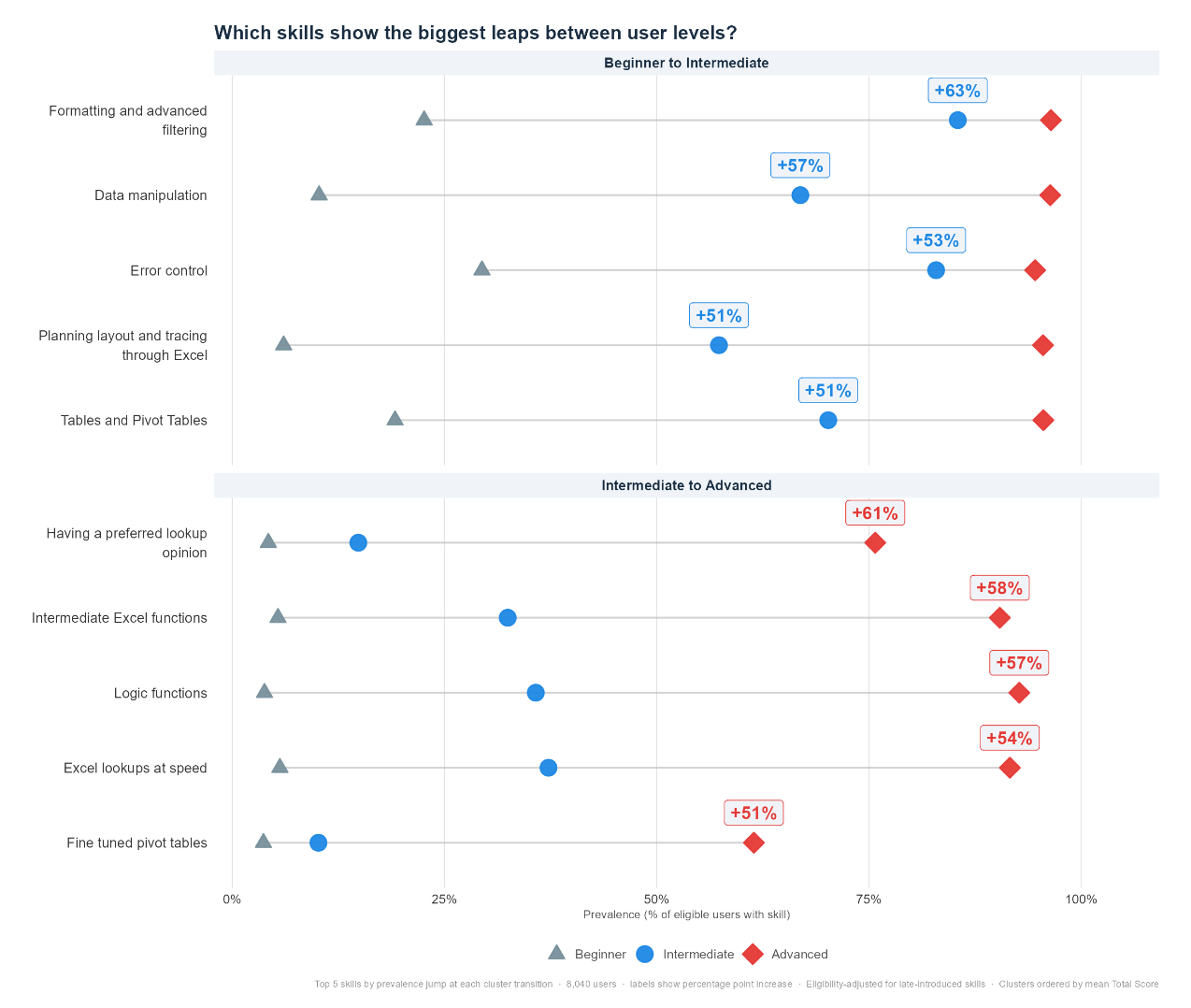
Beginner to Intermediate
To break out of Beginner Excel you can't just memorise more Excel functions. You need to start thinking like an Excel architect.
Intermediate users have started building spreadsheets for other people; including the future version of themselves who open the file six months later and need to understand it immediately. Beginners build for the moment. Intermediate users have the necessary skills to build something that anyone can trust and hand off.
The Excel Intermediate plans the layout of their workbooks, they imagine how the data flows through from start to finish and implement that in a cohesive style. And they consider potential errors which may crop up, ensuring appropriate checks are in built and easy to carry out.
Clearer workbook structure, using more tools allowing them to structure and manipulate the data while making it nicer to look at. Using tools like tables, pivot tables, filters, and formatting to craft a workbook others will appreciate thanks to its logic and ease of use.
Without these features, Excel is a fancy document for number dumps. Include them and it becomes a tool that lets data answer questions.
Intermediate to Expert
If Beginner-to-Intermediate leap is about starting to think architecturally, the Intermediate-to-Advanced leap is about thinking in the language of logic and having the vocabulary to use that language.
Advanced users start to think like programmers, their logic is layered: not just if this, then that, but multiple conditions, edge cases, and error handling built in from the start. A formula that gracefully handles every scenario didn't happen by accident, someone with an advanced skillset designed it that way!
Having wider vocabulary of Excel functions, they will be familiar with the functions SUMIFS, SUMPRODUCT, OFFSET, and Date & Text functions - reaching for them without thinking. Okay, OFFSET always requires some thinking when using the optional Height and Width arguments.
Opinions are created. Most experts have a view on which lookup function serves which situation: VLOOKUP, INDEX/MATCH, XLOOKUP, or the humble HLOOKUP. That opinion exists because they've used these functions enough to watch them work and watch them fail. Preference is evidence of experience; correct implementation of the best option is intuitive and seamless.
And they don't pause. An advanced user can write a lookup in under ten seconds and not forget the optional 0 argument at the end of a VLOOKUP. Fluency in any skill is executing familiar tasks without stopping to think. As people who have embraced keyboard shortcuts can attest, small speed improvements compound invisibly into significant time savings. It's the office worker equivelant of a butterfly in Brazil flapping its wings and causing a tornado in Texas.
A pivot table with slicers, timelines, sparklines, and calculated fields is also a great indicator of an advanced Excel user. Keep in mind that even experienced users may not necessarily possess high-level pivot table skills. We discovered that as users enter the realms of advanced Excel, they may start to specialize in certain areas: such as coding in VBA or using Microsoft’s BI tools: PowerQuery and PowerPivot.
Curious how you stack up? Try out our free self-assessment today.